

El préstamo interbibliotecario que amplía las colecciones de la biblioteca y entrega con rapidez—algunos
recursos electrónicos
en 15 minutos
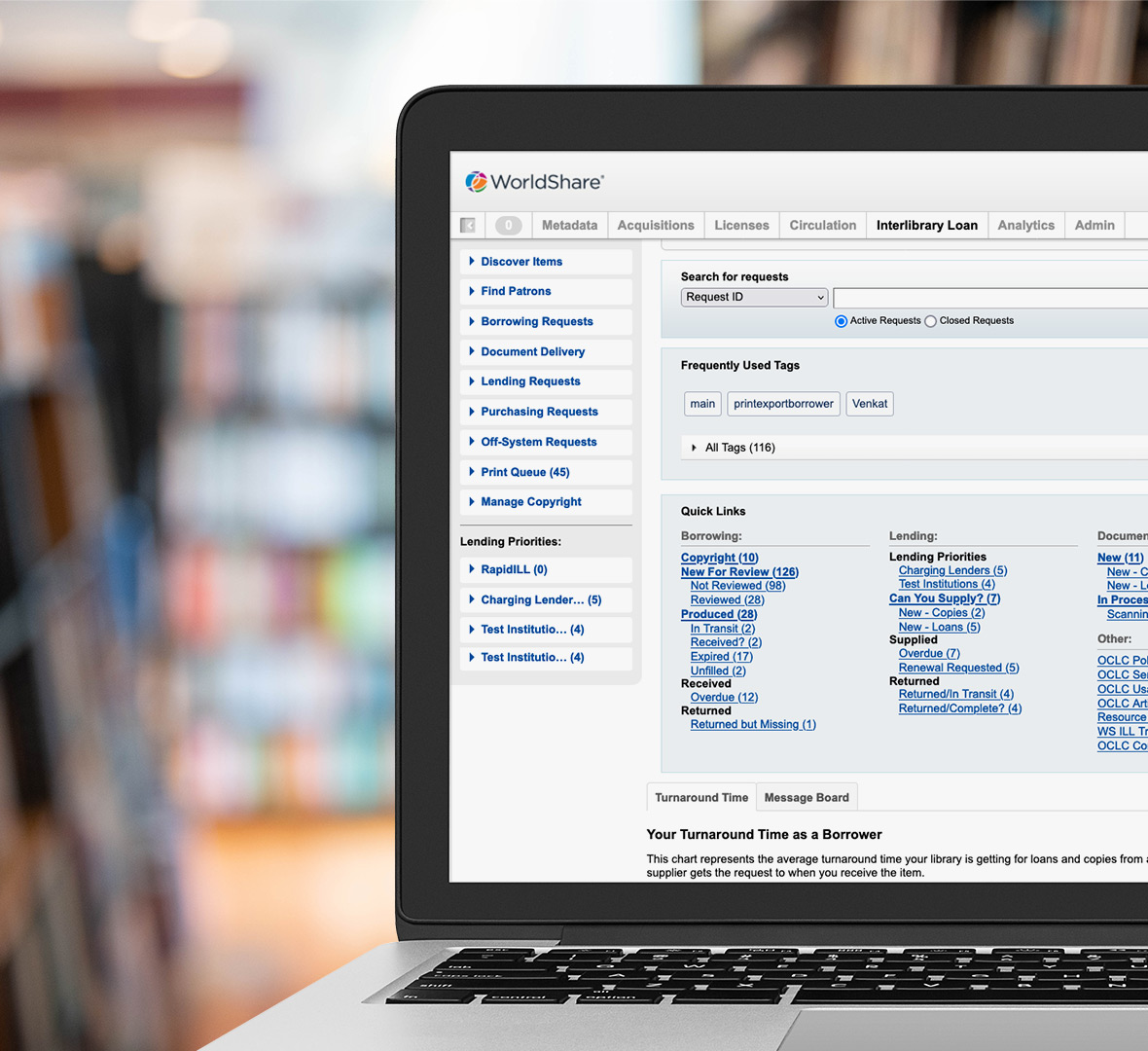

El servicio de Préstamo interbibliotecario WorldShare® es un servicio innovador basado en la nube. Automatiza los procesos de solicitud y entrega del préstamo interbibliotecario a través de la red de intercambio de recursos de OCLC de 10 000+ bibliotecas, la más grande del mundo.
Mejore la experiencia de usuario y optimice los flujos de trabajo
Amplíe la oferta de la biblioteca con acceso a miles de colecciones bibliotecarias
Una biblioteca sola no puede adquirir todos los recursos que existen. Con WorldCat® como base, la red de préstamo interbibliotecario de OCLC tiene acceso a millones de registros bibliográficos y miles de millones de existencias. Suministre rápidamente los recursos electrónicos o físicos que necesite, incluidos los materiales difíciles de encontrar. Revise fácilmente qué recursos están disponibles en otras bibliotecas, solicite su préstamo directamente y comparta sus materiales.
"Todas las nuevas funcionalidades de entrega automatizada, incluidas en WorldShare ILL, trabajan en conjunto para ofrecer una experiencia superior a los usuarios de nuestra biblioteca y un uso más eficaz del tiempo de nuestro personal de ILL".
Laura D’Amato
Exdirectora de servicios de acceso y préstamo interbibliotecario
Biblioteca Ritter, Baldwin Wallace University

Automatice los flujos de trabajo del préstamo interbibliotecario con entregas automatizadas
La funcionalidad de entrega automatizada pone en marcha procesos dinámicos basados en datos y le ayuda a conseguir tiempos de respuesta más rápidos. Es solo una parte de nuestra visión de la Biblioteca a la carta para ayudar a las bibliotecas a adaptarse con éxito a las expectativas cambiantes de los usuarios.

"La automatización es absolutamente imprescindible. Lo invito a que explore la nueva funcionalidad de entrega automatizada. Una gran ayuda para automatizar los flujos de trabajo del préstamo interbibliotecario".
William Gee
Director de Circulación y Préstamo Interbibliotecario
East Carolina University
Construido con los últimos estándares y se integra con su sistema bibliotecario


WorldShare ILL está construido con los últimos estándares (como NCIP, Z39.50, OpenURL e ISO 18626) y es compatible con FedRAMP. Con el propósito de agilizar los flujos de trabajo, también se integra con su sistema local, incluyendo su catálogo y circulación, junto con otros servicios de préstamo y proveedores de documentos. Además, está desarrollado en la plataforma basada en la nube WorldShare, siguiendo las últimas normas de accesibilidad y seguridad; de igual modo, cumple la norma ISO 27001 y el Marco de Ciberseguridad del NIST.
Visite nuestro Centro de Confianza y Seguridad para obtener más información sobre cumplimiento, confiabilidad, privacidad y seguridad.
Potentes funcionalidades de préstamo interbibliotecario para el personal de la biblioteca

Reciba solicitudes de cualquier servicio de identificación
Puede proporcionar un formulario de solicitud de préstamo personalizado que le permita recibir las solicitudes de los usuarios en WorldShare ILL sin tener que re introducirlas. Su biblioteca puede proporcionar acceso a este formulario OpenURL desde cualquier servicio de identificación (por ejemplo, WorldCat Discovery, EBSCO Discovery Service o Ex Libris Primo).

Automatice para ahorrar tiempo, reducir costes y lograr una entrega más rápida
WorldShare ILL simplifica los procesos mostrando las existencias, políticas y cargos de otras bibliotecas antes de realizar una solicitud. No obstante, si una biblioteca no puede satisfacer una solicitud, esta se envía automáticamente a la siguiente biblioteca disponible. Además, los procesos automatizados reducen la intervención del personal, lo que significa que su equipo puede centrarse en las solicitudes que necesitan más tiempo y atención.

Controle los costes del préstamo interbibliotecario y administre los pagos de manera eficaz
Administre con seguridad los costes y preste fácilmente materiales gratuitos y de acceso abierto. Por ejemplo, su biblioteca puede unirse a grupos como Libraries Very Interested in Sharing (Bibliotecas muy interesadas en compartir, LVIS) donde los 2.200 participantes prestan materiales de manera gratuita. Además, puede consolidar todas las transacciones del servicio de préstamo en una sola factura mensual gracias a la Administración de cargos de préstamo interbibliotecario o IFM (Interlibrary Loan Fee Management), permitiéndole así tener más tiempo para realizar tareas de mayor valor.

Ajuste los flujos de trabajo con informes detallados
Evalúe los patrones de solicitud y entrega para mejorar la organización del personal, los flujos de trabajo y políticas de préstamo con informes estadísticos. Estos datos incluyen las cifras de pedidos/entregas, las tarifas y los tiempos de respuesta, todo lo cual demuestra cómo el Préstamo interbibliotecario de OCLC contribuye a aumentar el valor de las bibliotecas.
¿Por qué elegir WorldShare ILL?
Velocidad, calidad y tecnología basada en los últimos estándares
- 10 000+ bibliotecas en la red global
- Comparta con bibliotecas en 50+ países
- 3 milliones+ solicitudes de recursos electrónicos entregadas a través de la red de OCLC cada año
- Los usuarios de las bibliotecas reciben los recursos electrónicos solicitados en 24 horas—a veces en tan solo 15 minutos
- Soporta NCIP, Z39.50, OpenURl e ISO 18626

El intercambio de recursos es nuestra pasión. Por lo tanto, ofrecemos varias soluciones de préstamo interbibliotecario. Como Tipasa®, un sistema de gestión de préstamo que proporciona una experiencia excepcional a los usuarios de la biblioteca y simplifica las complejidades del intercambio de recursos, y también el Préstamo interbibliotecario de OCLC para grupos.
Personalice los flujos de trabajo con potentes API de intercambio de recursos

Hay disponible una colección de API de préstamo interbibliotecario que le permite personalizar o ampliar los flujos de trabajo de préstamo específicos de su biblioteca.
Complete solicitudes de copias digitales rápidamente con el programa Express

Las bibliotecas participan en el programa de entrega digital Express que facilita un procesamiento del préstamo excepcionalmente rápido. El programa permite el intercambio de recursos digitales entre un grupo selecto de bibliotecas —aquellas con tiempos de respuesta de 18 horas o menos— que utilizan la red de préstamo interbibliotecario de OCLC. De igual modo, no hay coste adicional cuando una biblioteca tiene una suscripción a WorldShare ILL, Tipasa o ILLiad®.
Deles a los usuarios lo que quieren, cuando lo necesitan
WorldShare ILL mejorará la experiencia de usuario de su biblioteca a la vez que optimizará los flujos de trabajo del personal bibliotecario. Contacte con nosotros para hablar sobre sus necesidades específicas.
Disponibilidad del servicio
-
Disponible en todas partes
Asistencia y recursos de formación
Documentación del servicio de Préstamo interbibliotecario WorldShare
Centro comunitario de OCLC
Únase a la comunidad del servicio de Préstamo interbibliotecario WorldShare
Noticias
Próximos eventos
Esté atento a los próximos eventos sobre WorldShare ILL.
Eventos a la carta
29 April 2026
Enhancing the ILL experience: Integrated OCLC solutions from discovery to delivery

Descargue el folleto de WorldShare ILL
Descargue el folleto (carta EE. UU.)
Descargue el folleto (A4)