

Available everywhere
Connect your library to people who may never otherwise visit in person or online
WorldCat.org is a unique destination, representing the world’s largest library community on the web. It’s the only site where anyone can explore billions of items from a global network of thousands of library locations in a single search. It highlights libraries as trusted and relevant resources for credible information and advances our collective mission to increase access to the world’s knowledge.
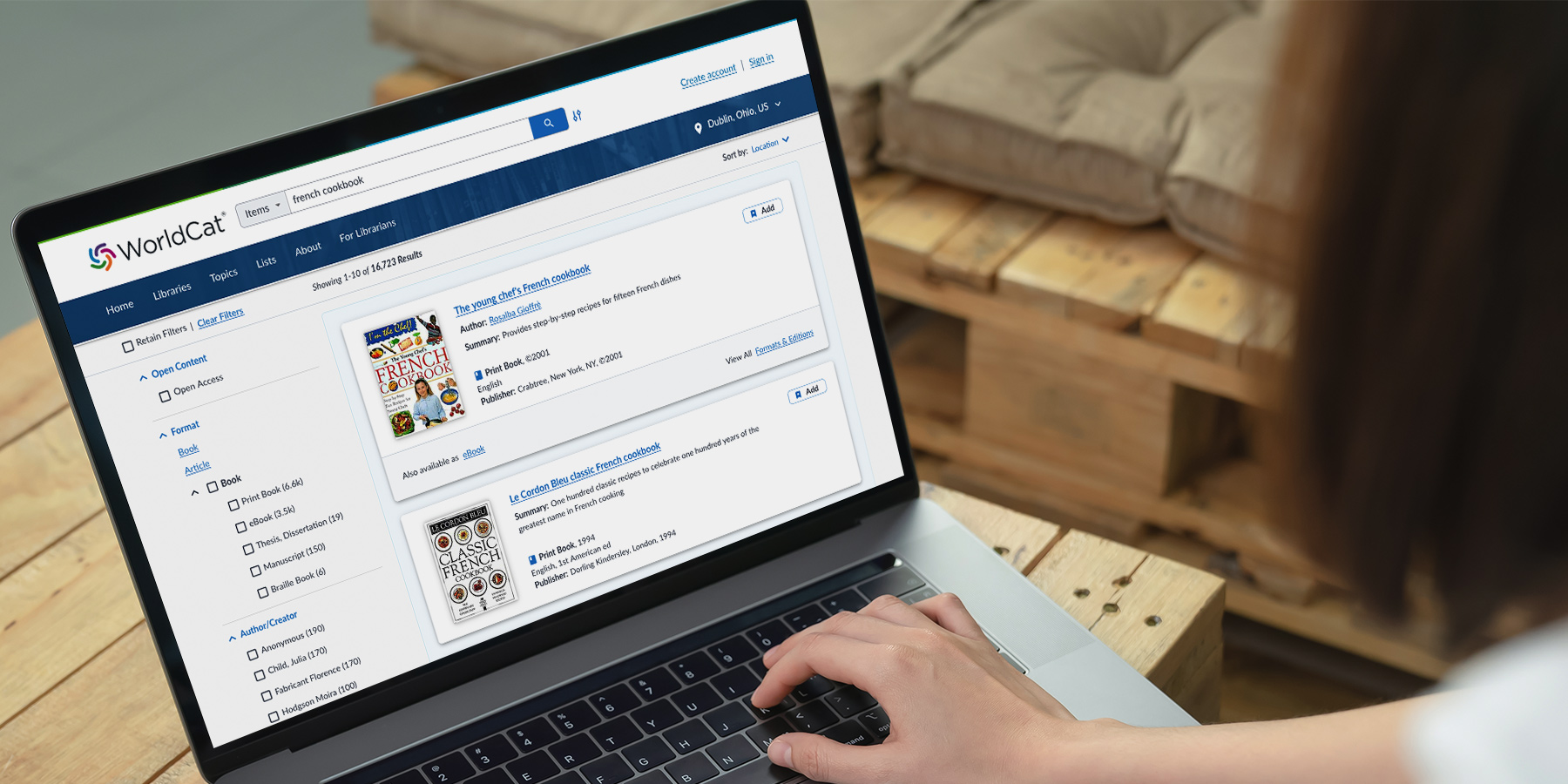
WorldCat.org is central to our web visibility program, giving libraries the opportunity to be visible where the search for information begins.
Learn more about our web visibility programTake me to WorldCat.org
WorldCat.org features

Location-based results
Pinpoints items in nearby libraries

Mobile optimized website
For people who prefer smartphones and tablets

Intuitive search experience
Simple and advanced options for all types of users

Open access prioritized
Prominent options for freely available content

Accessibility built in
Meets or exceeds standard accessibility guidelines

Highlighted e-content
More access to all kinds of electronic resources
Plus more of the features everyone loves
Favorite libraries
Users can personalize their experience by selecting up to five “favorite” libraries. WorldCat.org prioritizes those libraries’ materials in the user’s search results.
List creation for study, fun, and sharing
Users can create private or sharable lists of up to 500 items for personal, research, educational, or promotional purposes.
Prominent fulfillment options
Item pages feature a "Borrow" link that connects to the nearest holding library. Full listings for all libraries with the item are also displayed, along with purchase access options.
Citation tools
Users can generate and copy bibliographic citations for a single item or all items in a list using common citation styles.

Transform lives, one search at a time
WorldCat.org is grounded in real people and their stories. It starts with a search but can lead to life-changing discoveries. And your library is more likely to be part of that journey when your collections are included in WorldCat.org.
“[WorldCat.org] is incredible—the power of having all that knowledge easily accessible. So proud of OCLC for the foresight and staff abilities to take this giant leap forward.”
—Public library director
“Nearly everything I’ve ever searched for is there. WorldCat is this big base of everything all in one place—obscure books, popular books, movies, music, everything.”
—Assistant Professor

Extend reach and influence of your collections
With more than 70 million visits annually, WorldCat.org connects your library to people who may never otherwise visit. Partner websites like Google Books, Wikipedia, and Goodreads help spread the word about your unique local content even further.

Deliver greater access to information
WorldCat.org represents the world’s largest library community on the web with access to billions of items from thousands of libraries worldwide. Together we advance the collective mission of libraries to provide equal and equitable access to information.
“I tell everyone about WorldCat—and I love the excitement people feel when they realize that WorldCat will allow them to look up that book, movie, podcast, or transcript in their local library!”
—Artist & business owner
Maximize your institution’s visibility on WorldCat.org
Does your library participate in our web visibility program? If so, a small time commitment ensures that your library and its collections are presented accurately on WorldCat.org and that more information seekers connect with your library from the site.
Step 1: Refresh your profile in the WorldCat Registry
This profile determines how your name and location are displayed and enables people to access your catalog from WorldCat.org.
Step 2: Update your holdings in WorldCat
Accurate holdings in WorldCat ensure people can find and access all of your resources. You can request a streamlined holdings update at no additional cost with any OCLC cataloging subscription.
Step 3: Build library lists
Create a WorldCat.org staff account and build lists to highlight resources in your library’s collections.
Options for every kind of library
All OCLC cataloging members receive a basic institution listing on WorldCat.org. Additional web visibility subscriptions are available to help you reach more people.
Improve web visibility with WorldCat.org
We have reimagined how people find libraries online with a new WorldCat.org user experience, more ways to engage, and better connections from where people start their searches. Contact us to learn more about how working together helps more people find the information they need.
Service availability
Upcoming events
10 November 2026
BibControl Info-Tag / Anwender*innen-Treffen (German)
On-demand events
05 December 2023
Top three ways to promote your library with WorldCat.org lists
15 August 2023